ConnectEBT
- 4.6
- Rating
- 1.00M
- Installs
- Free
- Price

 Analysis by App-foxy
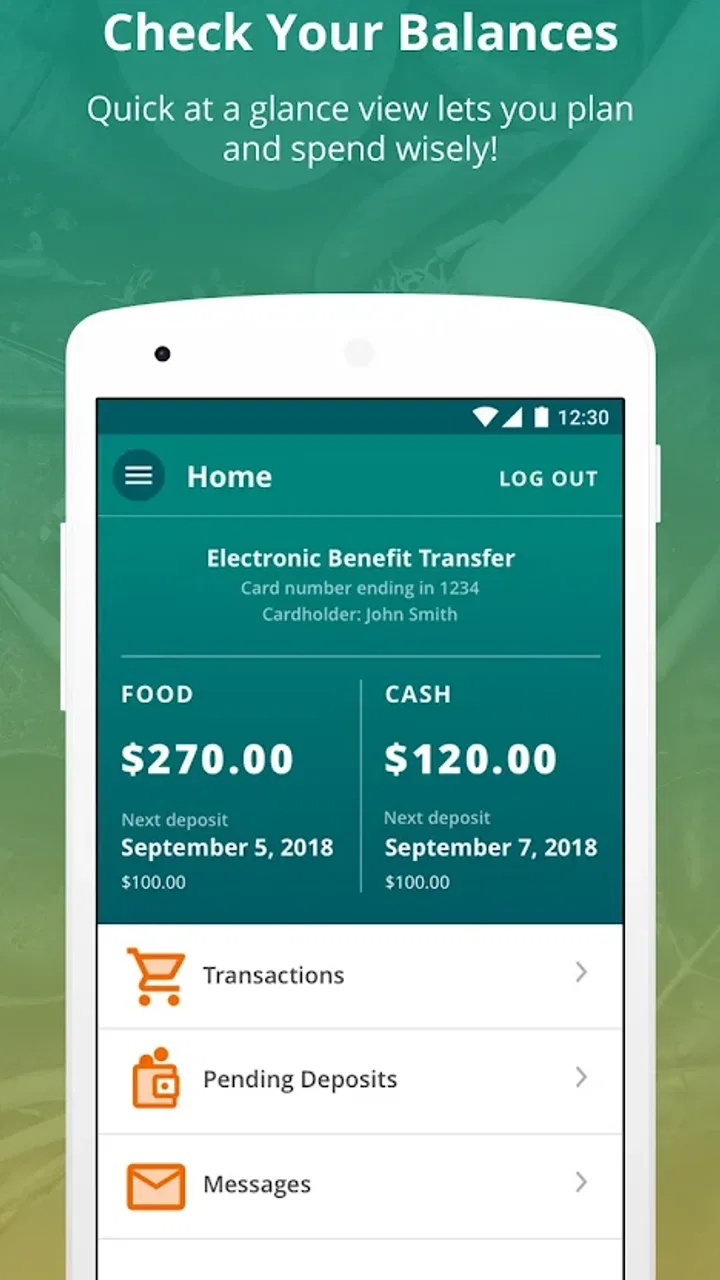
Managing food and cash assistance is easier when the information you need is available before you reach the checkout, and that is the role I found for ConnectEBT. This free finance app from Conduent Incorporated is designed for people who use EBT SNAP or Cash benefits and want a direct way to check their account information on a phone. It is not trying to be a complete budgeting platform, a banking replacement, or a shopping app. Its value is narrower and more practical: helping you make a better decision about your available benefits before you spend them.
I would judge an app like this by a few simple questions. Can I get to the important account details without unnecessary steps? Does it fit the way I already manage groceries and household expenses? Will it be useful often enough to justify keeping it installed? ConnectEBT makes the strongest case for itself when the answer depends on knowing your current SNAP or Cash balance while you are away from a computer or a phone call.
What ConnectEBT is best at in everyday use
My first impression is that ConnectEBT is a focused account-access tool rather than a broad personal-finance application. The store summary describes access to EBT SNAP and Cash account information, and that focus matters. You are not opening it to track investments, compare bank accounts, build a detailed spending plan, or replace a conventional banking app. You open it because benefit information is the immediate problem.
You May Also Like

 Blood Strike: 2.5 Anniversary
Blood Strike’s Loadouts Turn Every Drop Into a Tactical Gamble
A close look at Blood Strike’s custom loadouts: how fast access to signature weapons reshapes its battle royale rhythm, rewards preparation, and narrows the gap between fights.

 Pandora - Music & Podcasts
Pandora’s Music Is Easy to Start, but Harder to Recover
Pandora’s strength is its low-effort path from a seed to a station. Its weak spot is how much confidence it asks you to place in connection, setup, and quiet recovery.

 8 Ball Pool
 Is Built on Rivalries, Rematches, and Routine
A close look at the rivalries, rematches, shared routines, and unanswered safety questions that turn a quick pool match into a persistent mobile community.

 Samsung Music
’s Quiet Strength Is Playing What You Already Own
Its reach comes less from spectacle than from dependable access to a personal library. That simplicity is both the app’s strongest retention engine and its ceiling.

 AccuWeather: Weather Radar
AccuWeather Review: A Quick, Clear Forecast for Everyday Decisions
For everyday plans, the best forecast is the one you can understand quickly. AccuWeather makes rain timing, radar, and local conditions easy to act on, with a few trade-offs.

 Hill Climb Racing
Why Hill Climb Racing Still Turns Crashes Into One More Run
A tiny car, a bumpy hill and one more upgrade: Hill Climb Racing keeps resurfacing because its simple chaos makes every near-miss feel personal.
More From Our News Desk



That narrow purpose can be a real advantage. A general finance app may be excellent for bank balances but irrelevant to an EBT account. A website may contain the right information but feel awkward on a small screen. Calling a service line can work, yet it is less convenient when you are standing in a supermarket aisle and trying to decide whether your remaining balance will cover the items in your cart. ConnectEBT sits between those options: more direct than a general budgeting tool and more convenient than relying on a phone call.
In a realistic situation, I would use it before leaving home to check what is available, then look again while shopping if my list changes. That second check is where a dedicated EBT app becomes more useful than a notebook or a rough mental estimate. If I add household staples, choose a different package size, or shop for another person in the family, the account information can help me adjust the plan instead of guessing.
The app is also useful for separating two kinds of money that are easy to confuse when a household is under pressure. SNAP benefits and Cash benefits do not represent the same spending source, so having account information associated with both in one purpose-built app can reduce the chance of treating the wrong balance as available. I would still read the displayed account details carefully, especially before a large shopping trip, but the central workflow is straightforward: open the app, check the relevant account, and make a spending decision.
ConnectEBT has been available since April 19, 2017, and its current version is 2.3.8(20260119). It supports Android 7.0 or later, which makes it accessible to people who keep an older phone rather than upgrading frequently. That compatibility is more important here than it might be with a demanding entertainment app. Someone using an older device for basic communication and essential services may not want to replace a working phone simply to check benefit information.
The app is free and rated for Everyone. That combination makes it easier to recommend as a practical household tool, particularly when several members of a family share responsibility for shopping or managing assistance. I would not interpret the age rating as a guarantee that every part of the account process will feel effortless for every user, though. The person using it still needs to understand which account information applies to the purchase they are planning and should protect their login details as carefully as they would with any financial service.
Its reception also suggests that it has reached a substantial audience: ConnectEBT has more than a million installs, an average rating of 4.4, around 15 thousand ratings, and approximately 6.4 thousand written reviews. Those figures do not tell me that every user will have the same experience, but they do make it less of an unknown than a newly released utility with little history. I pay more attention to the app’s specific fit than to the rating alone, because a highly rated account tool can still be the wrong choice if it does not match a person’s benefit program or daily routine.
The decision criteria that matter most
The most important question is not whether ConnectEBT looks polished beside a full-service banking app. It is whether it gives you the account information you need at the moment you need it. If your main task is checking SNAP or Cash details, the dedicated approach is sensible. If you want one screen containing your checking account, credit cards, bills, savings goals, and benefits, this app is unlikely to replace your existing financial tools.
I would also consider how often you need to check your balance. A person who shops once a week and already has a dependable way to confirm benefits may see limited value. Someone who makes several smaller trips, shares shopping duties, or needs to plan purchases carefully can benefit much more from having a purpose-built option ready on the phone.
Another criterion is device age. Since the listed minimum operating system is Android 7.0, ConnectEBT is a plausible option for an older Android phone. That does not mean every older device will perform identically, but it removes one common barrier. Before installing, I would still make sure the phone has enough free storage and that its operating system is supported, because basic compatibility is only the starting point for a smooth experience.
Finally, I would think about access habits. If you prefer using a desktop browser, keep paper records, or speak with a service representative whenever you need information, an app may not change your routine enough to matter. If you already carry your phone while shopping, the app has a more natural place in your day. The best reason to install it is not novelty; it is reducing the number of steps between a question about your benefits and an answer.
Where the dedicated approach wins
ConnectEBT wins against ordinary budgeting apps because it is aimed at a type of account those apps may not handle in the same way as a bank account. A budgeting app can help categorize spending after the fact, but it does not automatically become a useful EBT information tool simply because it displays other financial accounts. For a SNAP household, that distinction is central rather than cosmetic.
It also wins over keeping a balance in a notes app. Writing down an amount can be convenient, but it becomes unreliable after purchases, deposits, adjustments, or any situation in which the recorded figure is no longer current. ConnectEBT is better suited to checking the account information itself instead of maintaining a manual estimate. My practical tip would be to use notes only for a shopping plan, not as the final authority on available benefits.
The app can also support a more deliberate shopping rhythm. Before leaving, I would check the account and set a realistic limit for the trip. At the store, I would use the information to decide whether an unplanned purchase fits. Afterward, I would avoid assuming that a mental calculation is exact, especially if several items were bought or if the transaction total was different from the shelf estimate. This three-part habit—check, adjust, verify—makes a simple balance app more useful than opening it only when a payment is declined.
Another less obvious strength is that it can help coordinate responsibilities. If one person plans meals and another person does the shopping, the shopper does not have to rely entirely on a message saying how much should be available. The person carrying the phone can check the account information directly and make decisions in the aisle. That does not eliminate the need for communication, but it can reduce avoidable misunderstandings between a household’s shopping plan and its actual available benefits.
For people with an older Android device, the minimum operating system requirement is another practical advantage. Many modern finance products assume relatively recent hardware or software, while ConnectEBT’s stated support for Android 7.0 or later gives it a broader starting point. I would choose this kind of compatibility over extra visual effects in an app whose main job is to provide essential account information.
Where another option may fit better
ConnectEBT is not the right answer for every financial question. If you want to see a complete household budget, compare income with rent and utilities, or monitor several bank accounts together, a general budgeting app may be a better companion. That alternative offers a wider view of money, while ConnectEBT offers a more specific view of EBT SNAP and Cash information. Trying to force one into the role of the other would create frustration.
A browser-based account portal may suit someone who prefers a larger screen or does not want another app on their phone. A phone call may remain preferable when the issue is complicated, urgent, or not answered by the account information shown in the app. I see ConnectEBT as a convenient first stop for routine checking, not as a substitute for every official support channel.
There is also a trade-off in specialization. Because the app centers on benefit information, it may feel limited to users expecting built-in meal planning, receipt organization, spending categories, or broader financial coaching. Those expectations belong to a different category of product. The absence of those wider functions is not automatically a flaw; it becomes a limitation only when a user installs ConnectEBT hoping for a complete money-management system.
People who rarely use smartphones may also prefer a familiar alternative. An app can be free and still carry a learning cost: installing it, signing in, remembering how to reach the relevant account, and keeping the phone available during shopping. For a user who already has a comfortable routine through another channel, switching may not deliver enough benefit to justify changing habits.
Security and privacy should influence the choice as well. This is financial account information, even though it concerns benefits rather than a conventional bank balance. I would avoid signing in on a shared or public device, use a phone lock, and be cautious about showing the screen in a crowded checkout line. Those are sensible habits for any account-access app, and they matter more than convenience if the phone is frequently borrowed or left unattended.
The real cost of switching to an app-based routine
Because ConnectEBT is free, the main cost of switching is not a subscription. It is the time and attention required to make the app part of your routine. You need to install it, complete the account-access process, and learn where the information you care about appears. For many people, that is a small one-time effort. For others, especially anyone uncomfortable with phone settings or account credentials, the setup may feel like a barrier.
I would make the transition gradually rather than abandoning an existing method immediately. Keep using your usual way to confirm benefits during the first few shopping trips, while also checking ConnectEBT. Compare the information you see and notice whether the app is genuinely faster for you. Once the routine feels dependable, it can become the first option for ordinary balance checks while the alternative remains available for unusual questions.
A useful switching habit is to check before shopping rather than waiting until the checkout. That gives you time to revise the list, ask another household member for clarification, or choose a different trip plan. It also avoids turning a busy checkout line into the place where you discover that your estimate was wrong. The app’s value increases when it is used for planning, not only for troubleshooting.
I would also avoid treating the displayed balance as a full household budget. Even with current account information, you still need to consider what you have already placed in the cart, which purchases belong to SNAP or Cash, and what other expenses compete for the same resources. ConnectEBT can inform the decision, but it does not make the decision for you. That boundary is important for preventing overconfidence.
For families, I would agree on who checks the account and how the information is shared. One person can use the app before a trip, while another confirms the list and expected total. This is a simple workflow, but it prevents the app from becoming one more isolated piece of information that only one household member understands. The strongest benefit comes when the account check is connected to an actual shopping plan.
My recommendation for different kinds of users
I recommend ConnectEBT to Android users who receive SNAP or Cash benefits and want a convenient way to access their account information while planning or making purchases. It is especially suitable for people who shop frequently, manage benefits for a household, use an older Android phone, or dislike relying on memory and handwritten balance estimates. Its free price and focused purpose make it a low-risk addition to an existing routine.
I would be more cautious about recommending it as a standalone finance app. If your goal is to manage all household money in one place, you should keep a broader budgeting or banking solution for that job. ConnectEBT can complement those tools by covering the EBT information they may not handle well, but it should not be judged as though it were designed to replace them.
I would also suggest skipping it if you do not use EBT SNAP or Cash benefits, because its central purpose will not match your needs. Likewise, if you strongly prefer a computer or direct support call and rarely check information on a phone, the convenience may not outweigh the effort of changing your routine. A specialized app is valuable precisely because it serves a specific situation; outside that situation, its narrowness becomes obvious.
For everyone else, my advice is to install it with a clear test in mind: use it before a shopping trip, use it again when the plan changes, and see whether it reduces uncertainty. Pay attention to how quickly you can reach the account information and whether the workflow feels natural on your device. If it helps you make calmer, more informed purchase decisions, it has earned a permanent place on your phone.
Overall, ConnectEBT is a practical, specialized finance app rather than an ambitious all-in-one money manager. Developed by Conduent Incorporated, it has the right focus for users who need EBT SNAP and Cash account information close at hand. I like it most as a planning and checking tool: simple in purpose, useful in the supermarket, and compatible with an older Android starting point. Its limitations are clear, but so is its role. If that role matches your daily needs, I would recommend giving it a try.
The final decision is therefore straightforward. Choose ConnectEBT when direct EBT account access matters more than broad budgeting features. Keep a browser, phone service, or general finance app available when your question goes beyond routine account checking. Used with that realistic expectation, it can remove a surprisingly common source of stress: not knowing what is available until the moment you need to pay.
FAQs for ConnectEBT
01What is ConnectEBT and how does it work?
ConnectEBT is a mobile application designed for Electronic Benefit Transfer (EBT) cardholders to manage their benefits efficiently. It allows users to check their balance, view transaction history, and receive alerts about their benefits. The app offers a user-friendly interface and aims to simplify the process of keeping track of food assistance and cash benefits.
02Is ConnectEBT available for both Android and iOS devices?
Yes, ConnectEBT is available for download on both Android and iOS platforms. Users can find the app in the Google Play Store for Android devices and the Apple App Store for iOS devices. This ensures accessibility for a wide range of users, regardless of their preferred device.
03Are my personal and financial details secure on ConnectEBT?
ConnectEBT prioritizes the security and privacy of its users. The app employs advanced encryption protocols to protect personal and financial information. Additionally, users are required to set up a secure password and can enable biometric authentication for added security. It’s always recommended to regularly update your app to the latest version to benefit from enhanced security features.
04Can I use ConnectEBT to find nearby stores that accept EBT?
While ConnectEBT primarily focuses on providing balance and transaction information, it does not include a feature for locating nearby stores that accept EBT. However, users can often find this information through their state’s EBT website or other dedicated apps and resources that focus on store locations.
05What should I do if I encounter issues with the ConnectEBT app?
If you experience any problems with the ConnectEBT app, it is recommended to first check for updates, as they may resolve existing issues. If the problem persists, you can contact the customer support team through the app or the official website. They can assist with troubleshooting and provide further guidance to ensure the app functions correctly.
Pros
- User-friendly interface for easy navigation.
- Quick access to balance and transaction history.
- Secure login with multi-factor authentication.
- Notifications for important account updates.
- Supports multiple languages for accessibility.
Cons
- Requires constant internet connection.
- Limited customer support options.
- Occasional app crashes reported by users.
- Does not support older device models.
- Account setup can be slightly confusing.

ConnectEBT
Gallery